What is New in Portfolio Shift: Unified Rebalancing for Funds, Stocks, ETFs, Cash and Tax
Portfolio Shift grows from a mutual fund rebalancer into a complete portfolio construction engine handling funds, equities, ETFs, cash constraints, and tax impact in one workflow.
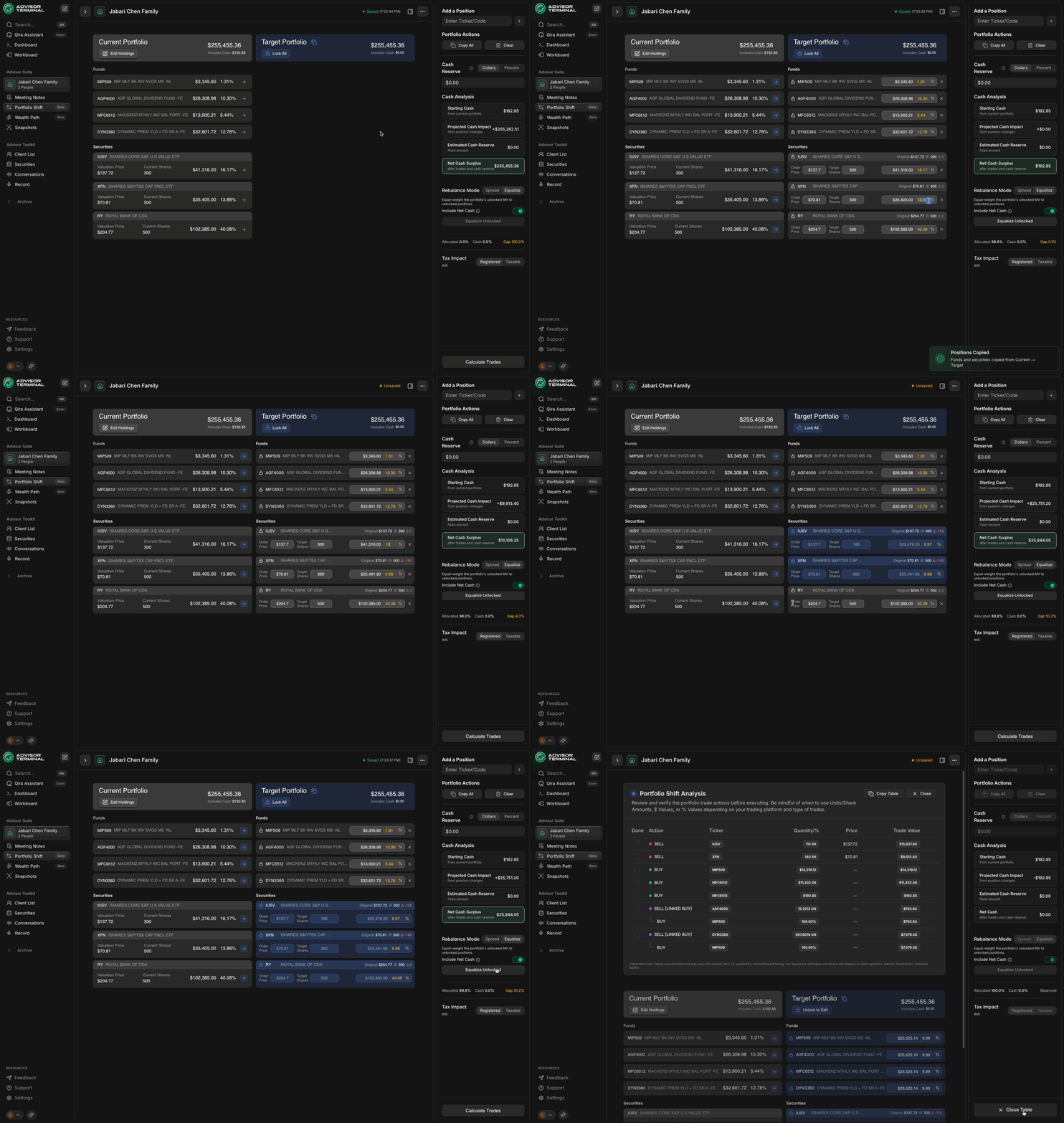
Portfolio Shift has always been about turning portfolio changes into clear, actionable trades.
With this release, it grows from a mutual fund rebalancer into a complete portfolio construction engine that can handle funds, individual equities, ETFs, real world cash constraints and the tax impact of your trade plan, all in one workflow.
If you are used to juggling separate spreadsheets for stocks, funds, cash and tax, this update is meant to replace that patchwork with a unified, powerful, end to end flow.
Quick recap: what Portfolio Shift does
Portfolio Shift is Advisor Terminal's rebalancing and portfolio construction module. You import a client's current holdings, create a new target portfolio, and Portfolio Shift translates the gap into a clear list of trades.
In the original version, this was designed primarily around mutual funds priced at end of day. It was already effective for fund based practices, but did not fully reflect how advisors manage portfolios that hold a mix of funds, stocks and ETFs.
This release closes that gap.
Why this upgrade matters for advisors
In practical terms, the new Portfolio Shift helps you:
Rebalance mixed portfolios in one place
Funds, ETFs and individual stocks can sit in the same target portfolio and the same trade actions.
Respect how trading actually works
Whole share rounding for equities and ETFs, separate valuation and order prices, and clear cash routing reflect how you actually place trades.
Treat cash as a first class decision
Set explicit cash reserves, see the projected surplus or shortfall in real time, and resolve it with a couple of clicks rather than separate math.
Anticipate tax impact before you commit
For taxable accounts, you can estimate realized gains or losses and the resulting tax liability or tax shield before you place trades.
Reduce prep time for every rebalance
Custom CSV import templates and editable holdings let you go from dealer export to working target portfolio in minutes.
All of this is still advisory only. Portfolio Shift tells you what needs to happen. You remain in full control of the final trades and where they are executed in your own dealer platform.
Unified target portfolios for funds, stocks and ETFs
From fund only to full portfolio
Previously, Portfolio Shift focused on mutual funds that settle at end of day, using units with up to four decimal places. That is still supported, but your target portfolio can now include:
- Mutual funds
- Exchange traded funds
- Individual equities
All in one table.
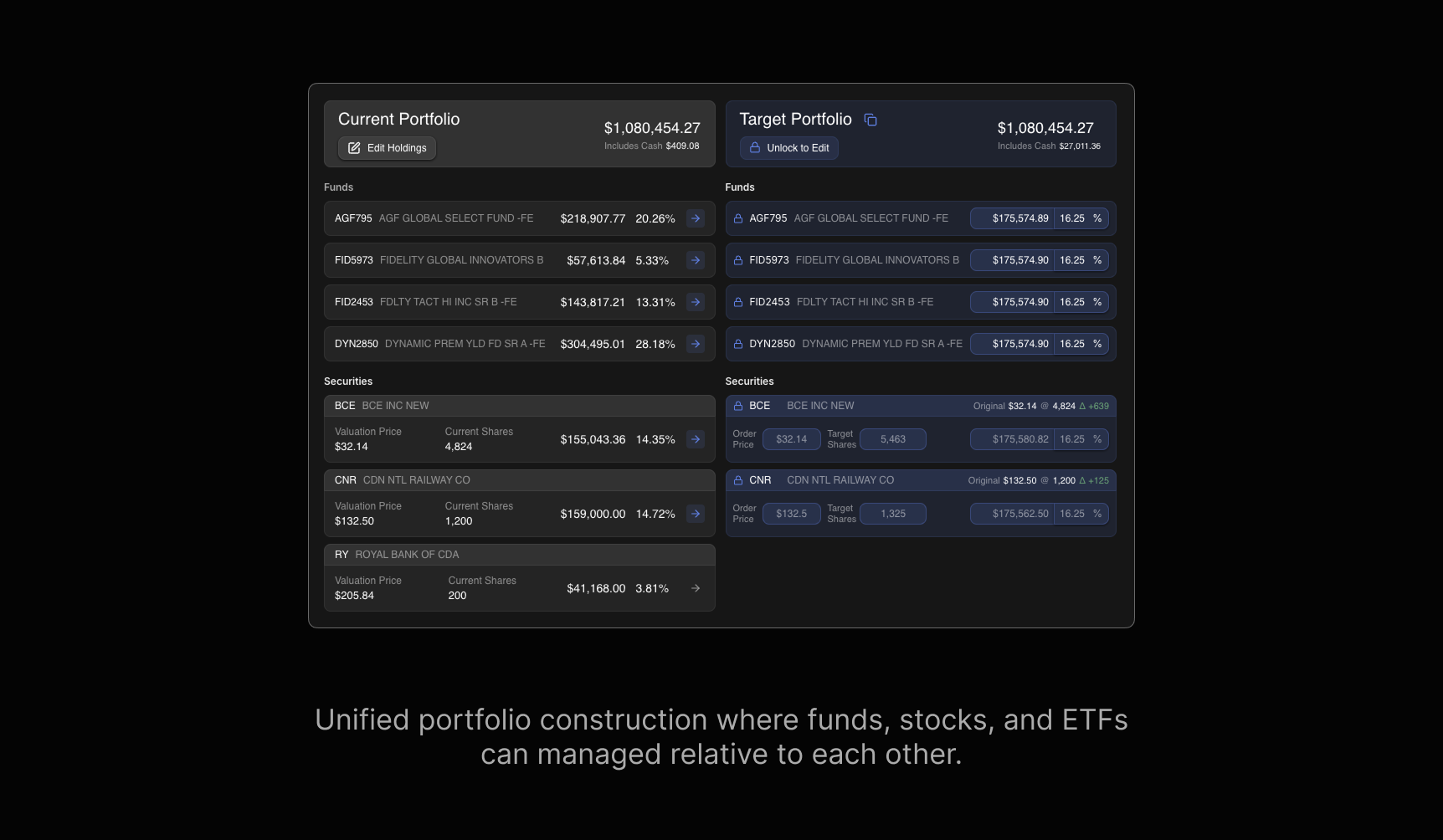
For each position you can define:
- Target percentage
- Valuation price and current market value
- Order price, if you want to simulate using a limit order
- The resulting number of units or shares
Mutual funds still use fractional units. Equities and ETFs are handled as whole share positions, with any fractional remainder moved into cash.
The result is a single rebalance that respects the different mechanics of funds and listed securities without pushing you into separate tools.
Cash management: reserves, surplus, shortfall and live math
In most rebalance tools, cash is an afterthought. In this release, cash gets its own dedicated logic.
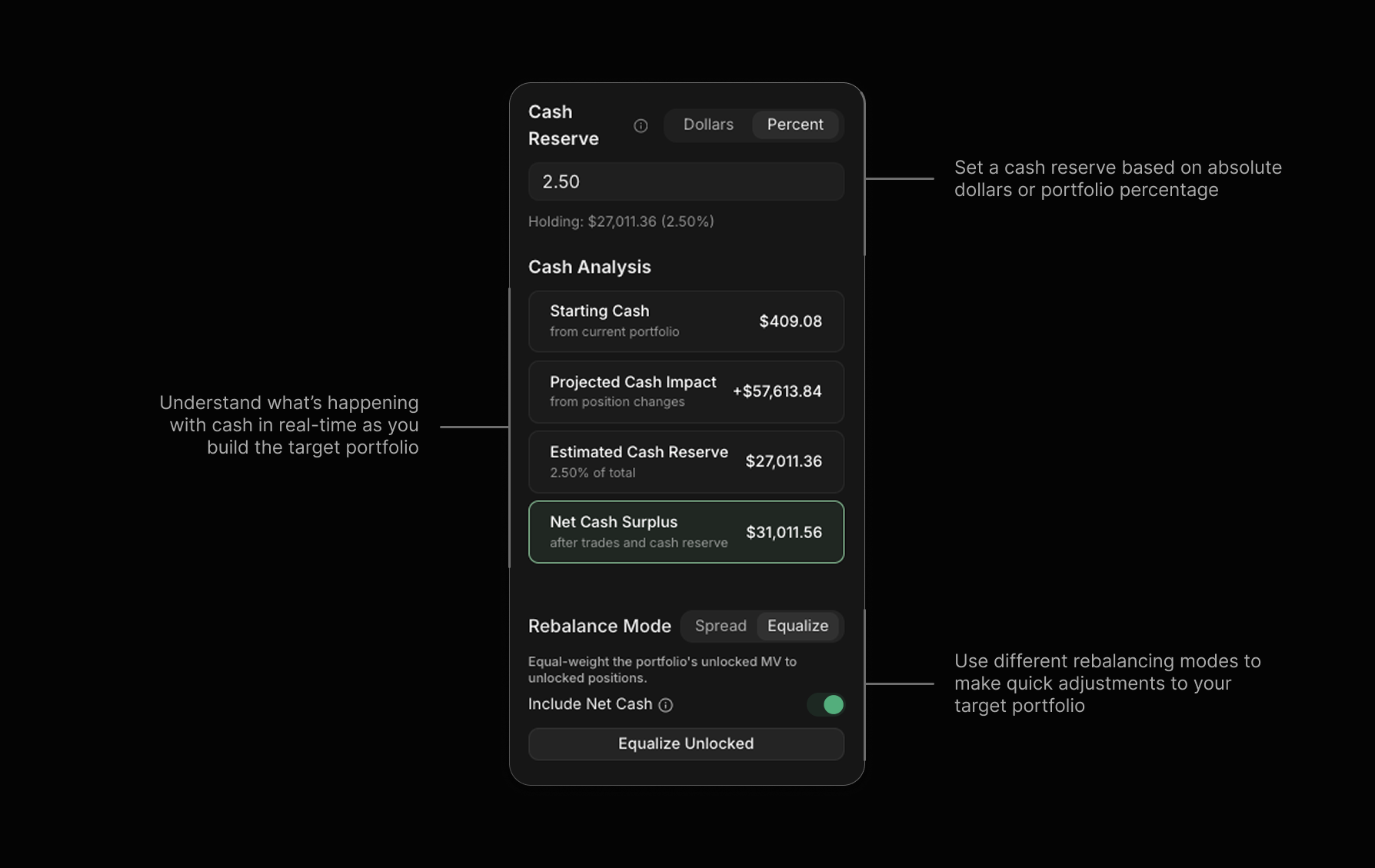
Set a cash reserve by dollar or percentage
You can define how much cash you want to see left in the account once all trades have settled. That can be set as:
- A fixed dollar amount
- A percentage of the total account value
Portfolio Shift then treats that reserve as a hard constraint as it calculates trades.
See projected cash impact as you adjust targets
As you edit the target portfolio, Portfolio Shift continuously recalculates:
- Cash generated from sales
- Cash required for purchases
- The resulting net cash surplus or shortfall
You see this in a simple summary rather than having to recreate the math in Excel. Change a target weight, change an order price, add or remove a holding, and the projected cash impact updates immediately.
This makes it very hard to accidentally over invest an account or leave more idle cash than you intended.
New rebalancing modes: spread and equalize
Once you know your net cash position and your desired reserve, you still need a practical way to allocate surplus cash or resolve a shortfall.
Portfolio Shift introduces two new rebalancing modes that sit on top of your targets and locks.
Spread
Spread takes a cash surplus or shortfall and distributes it across all unlocked positions.
This is useful when:
- A client makes a deposit and you want to add incrementally to several holdings rather than just one, or
- You are close to your desired weights and simply want to smooth out residual cash.
Equalize
Equalize sets all unlocked positions to the same target weight, within the constraints of your cash reserve and whole share rounding for equities and ETFs.
Advisors often like to see anchor positions at clean weights, for example several holdings at ten or twenty percent. Equalize lets you move to that pattern in one click.
Locked positions are respected in both modes. Net cash is also treated explicitly, so you can decide whether to include it in the equalization or leave it aside with your chosen reserve.
Valuation price, order price and realistic share counts
A common friction point in model based planning is that the price you used to value the portfolio is not the price you expect to trade at.
The new Portfolio Shift separates those concepts.
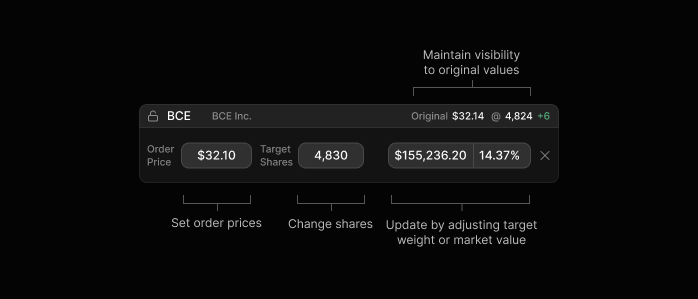
- Valuation price is based on the imported data. This is the price used to show current market value and overall portfolio composition.
- Order price is the price you enter to simulate the limit or target price you intend to use when trading the position.
For equities and ETFs, the system uses the order price to calculate:
- The number of shares to buy or sell
- The resulting cash usage
- Any residual cash after rounding to whole shares
This gives you a trade plan that looks like what you would actually place on your dealer platform rather than a purely theoretical allocation.
Tax impact estimator for taxable accounts
Rebalancing decisions in taxable accounts are never just about weights. Tax matters.
If your imported file includes book values for the positions, Portfolio Shift can now estimate the tax effect of your proposed trades.
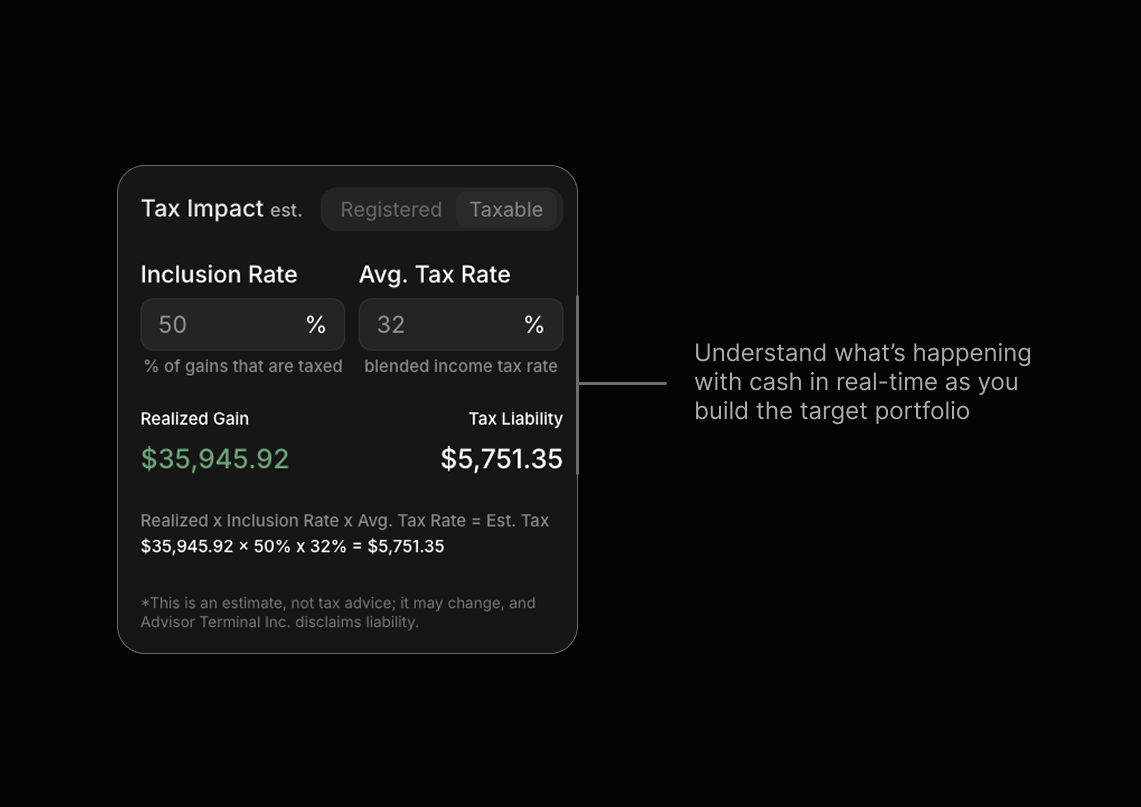
For a taxable account you can:
- Toggle into a tax aware view
- Set the capital gain inclusion rate
- Set or adjust the client's marginal tax rate
Portfolio Shift then uses the difference between:
- The imported book values, and
- The effective sale prices implied by your trade actions
to estimate:
- Realized gains and losses
- The portion of gains that are taxable
- The estimated tax payable on those gains
- Or, in the case of a net loss, the implied tax shield from those losses
Estimates are provided at a summary level and per trade. This is for planning only and is not tax advice, but it gives you a fast way to understand the likely tax consequences of your rebalance before you proceed.
Flexible CSV import with templates and editable holdings
The new import flow is designed to fit the reality of how advisors get data from dealer platforms.
Custom import templates
You start by exporting a holdings file from your dealer system in CSV or similar format. In Portfolio Shift you:
- Drag and drop the file into the importer.
- Just once, map each column to a field in Portfolio Shift, such as symbol, security name, quantity, price, and book value.
- Identify which row or column represents the cash balance so that it can be handled separately from securities.
- Save this mapping as a template for that dealer or custodian export.
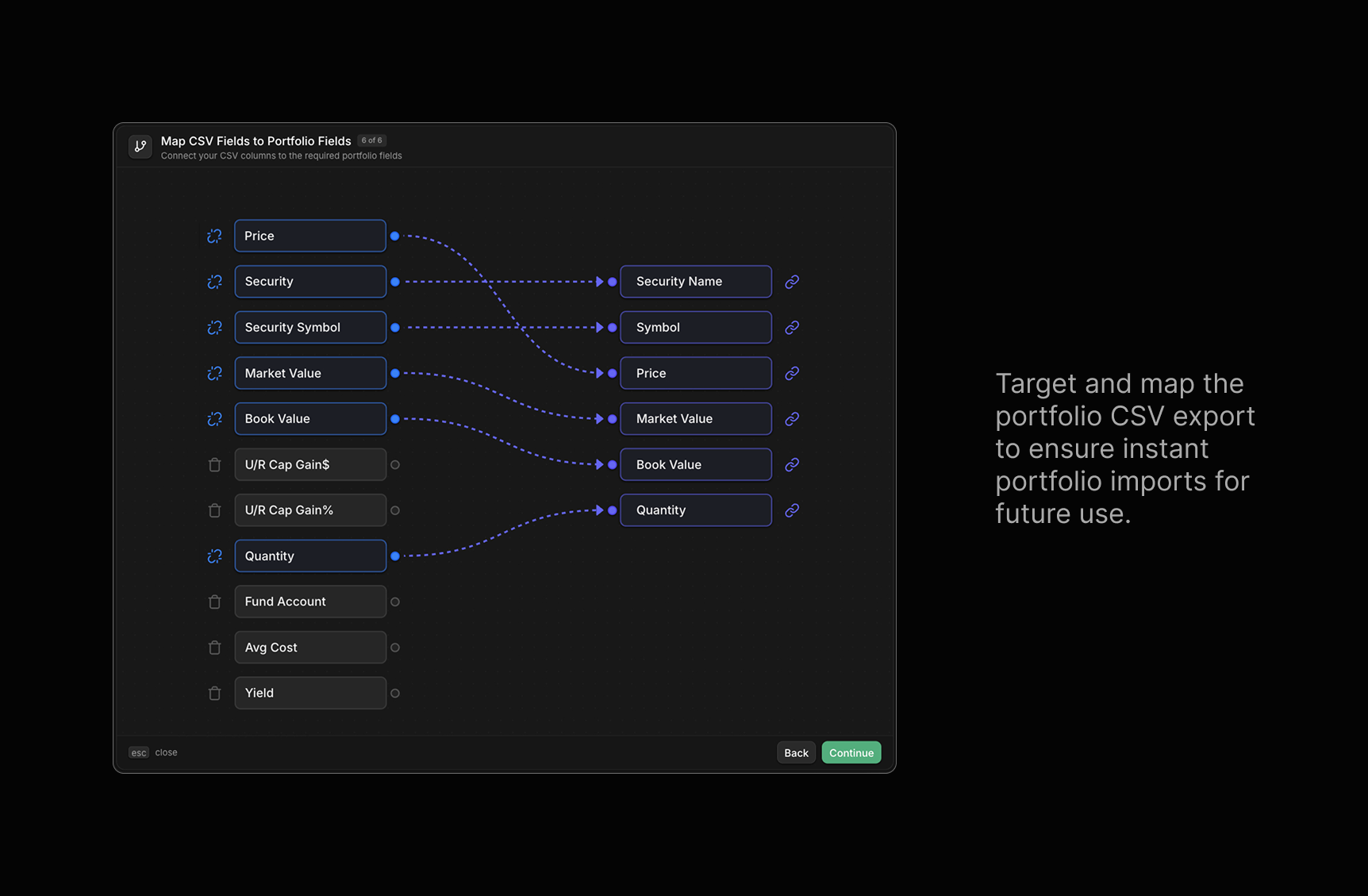
Next time you export from the same platform, the system auto-uses the template. Portfolio Shift will map the columns so the portfolio is ready in seconds.
Edit holdings and add cash after import
Once the current portfolio is imported, you can:
- Edit the price or value of a holding if you want to work with fresher numbers than the statement CSV export if like some dealers, only has yesterday's information
- Add additional cash to reflect an upcoming deposit that has not yet appeared in the file
This lets you start from the official export, then quickly overlay your working assumptions before you build the target portfolio.
Trade analysis and exportable tables
The output of Portfolio Shift is still a trade analysis, but it is now more complete.
The trade analysis view now:
- Includes funds, ETFs and individual equities in one list
- Shows buys, sells and switches with units or shares for each security
- Respects whole share rounding for listed securities
- For taxable accounts, incorporates the estimated tax impact of each sale
To make it easy to use these results elsewhere, Portfolio Shift also provides:
- A copy and paste friendly table of the target portfolio
- A copy and paste friendly table of the trade actions
You can drop these directly into your CRM notes, internal files or client communication templates without having to write everything manually.
How a typical workflow looks with the new Portfolio Shift
Here is a simple end to end pattern for using the upgraded Portfolio Shift in a client review:
Import the current portfolio Export the client's holdings from your dealer platform and drag the file into Portfolio Shift.
Apply or create an import template Map the columns once if this is a new format, or apply an existing template if you have used this dealer before. Confirm cash, book values and key identifiers are correctly mapped.
Review and edit current holdings Update any stale prices or values, adjust quantities if needed, and add any upcoming cash deposits you want to include in this rebalance.
Set your cash reserve and watch cash impact Define how much cash you want left at the end, either as a dollar amount or percentage. Observe the projected cash surplus or shortfall as you tweak targets.
Build the new target portfolio Add or remove funds, ETFs and stocks. Set target percentages, valuation prices and, for listed securities, order prices if you want to simulate trading at different levels.
Use rebalancing modes for quick changes or to resolve residuals Use Spread to distribute surplus or shortfall across unlocked positions, or Equalize to create clean equal weights across a group of holdings.
Enable tax mode for taxable accounts For non registered portfolios, enter the capital gain inclusion rate and the client's marginal tax rate, then review the estimated tax impact of the proposed trades.
Generate the trade analysis and export tables Review the list of buys and sells, confirm cash and tax results, then copy the trade and target tables into your notes or client email.
You remain in control of which trades you actually place and where they are executed. Portfolio Shift's job is to give you a clear, coherent plan that respects your constraints.
Closing thoughts: one flow for realistic, advisor grade rebalancing
This release of Portfolio Shift is about making your rebalancing process more realistic, more precise and far less manual.
You can now:
- Build a unified target across funds, ETFs and stocks
- Respect cash reserves and real world trading prices
- See tax impact before you commit to trades
- Go from dealer export to complete rebalance plan in a single, traceable flow
In other words, you design the target, Portfolio Shift handles the math, and you decide how to act.